MAI-Image-2.6 prompts: four lessons from Microsoft AI
Microsoft's MAI-Image-2.6 arrived at No. 2 on Arena. The more reusable part of the release is the prompts published beside it — four distinct styles, four rules you can apply to any image model.

On August 10, 2026, Microsoft AI announced MAI-Image-2.6 and said it ranked second on the Arena text-to-image leaderboard, improving +79 Elo over MAI-Image-2.5 overall, with text rendering alone up +91 Elo. That is the headline, and like most leaderboard headlines it expires quickly.
The part of the release with a longer shelf life is quieter: across the MAI-Image-2, MAI-Image-2.5, and MAI-Image-2.6 pages, Microsoft published the actual prompts behind its sample images. Those prompts are not a random assortment. They are four clearly different ways of writing to an image model, and each one is doing a specific job — describing, compressing, editing, and referencing.
MAI-Image is not in OmniArt's model picker, so this is not a review of a model you can run here. It is a read of the prompt craft on display, because that craft transfers. The four patterns below work on any capable current image model, and the lesson in each is the same shape: what you put in the prompt determines which failure you get.
What Microsoft shipped across MAI-Image 2, 2.5 and 2.6
Three releases in under five months, each with a different center of gravity:
| Release | Announced | Microsoft's positioning | Arena claim |
|---|---|---|---|
| MAI-Image-2 | March 19, 2026 | Photorealism, in-image text, rich scene generation — "built with creatives" | No. 3 model family |
| MAI-Image-2.5 | Model page | Precise editing, material accuracy, design-aware output; Pro / standard / Flash variants | Third in text-to-image, as of June 2, 2026 |
| MAI-Image-2.6 | August 10, 2026 | Text rendering, portraits and 3D, commercial and cinematic polish | Second on text-to-image; +79 Elo over 2.5 |
MAI-Image-2.5 also split into a family: 2.5-Pro for object consistency and visual reasoning, 2.5 for generation plus controllable editing, and 2.5-Flash, which Microsoft describes as production-ready at less than half the price of the flagship. The 2.5 model page charts "Image Arena Elo vs. representative API price per 1,000 images," which tells you what the team is optimizing: not peak quality alone, but quality per dollar.
For 2.6, Microsoft says there is more that has not been detailed yet — "working across multiple references and richer grounding to greater control over reasoning, format and resolution." Until that ships publicly, it is a roadmap statement, not a spec.
Lesson 1: the long structured prompt puts each fact in its own slot
The prompt behind the photorealism sample on the MAI-Image-2.5 page is roughly 90 words, and its structure is more interesting than its length:
A young woman in profile on a rooftop, blowing soap bubbles against an overcast sky. She has long straight black hair, windswept slightly, and wears a dark navy double-breasted school uniform jacket with gold buttons and a white collar. She holds a hot pink bubble solution bottle in one hand and a neon lime-green wand to her lips in the other. Five iridescent bubbles of varying sizes float around her.
Behind her: low-rise apartment buildings under a flat gray sky, a black metal railing, and weathered concrete underfoot. Film photography aesthetic.
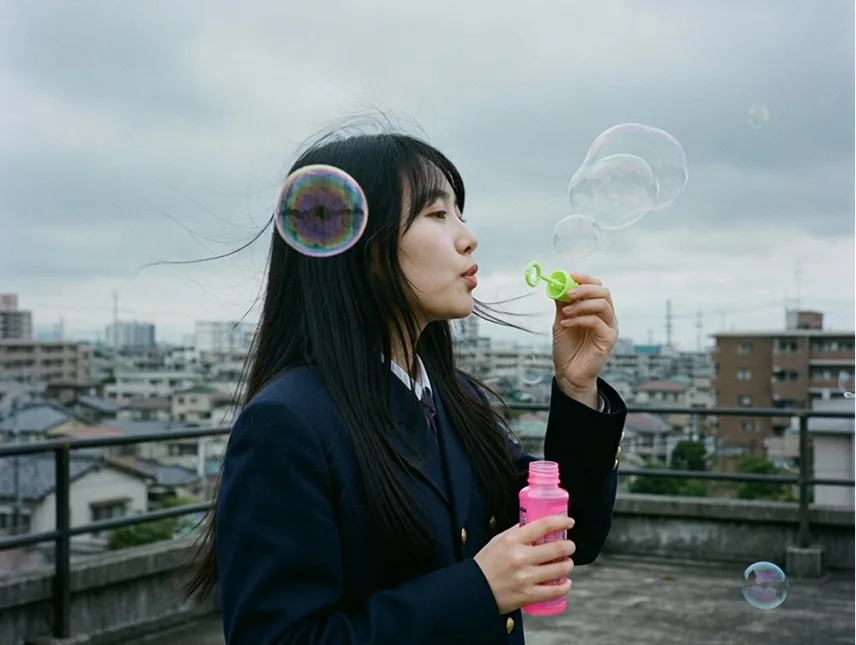
Read it again as a form rather than a sentence. Sentence one is subject, pose, action, and sky. Sentence two is hair and wardrobe. Sentence three is props, one per hand. Sentence four is a countable element. Then a labelled block — Behind her: — takes everything environmental, and a two-word style directive closes the prompt.
Three things in that structure do real work:
- Named colours instead of adjectives. "Hot pink," "neon lime-green," "dark navy," "gold," "flat gray." Not "bright," not "colourful." A colour name is a constraint the model can satisfy or fail visibly; "vibrant" is not.
- A number instead of a quantifier. "Five iridescent bubbles of varying sizes" is checkable. "Some bubbles" is not. In the published output the count holds — you can stand in front of the image and audit it, which is exactly the point.
- The background gets its own container.
Behind her:fences off the environment so its detail cannot leak into the subject description. Long prompts fail when the model has to guess which noun a modifier belongs to.
The style keyword lands last, after the content, so it modifies a scene that is already fully specified rather than steering the composition itself.
Tip
Write long prompts as slots, not as prose: subject and action, then appearance, then props, then countable detail, then a labelled environment block, then style. If you cannot point at which slot a word belongs to, the model cannot either.
Lesson 2: the short prompt buys composition with a simile
The MAI-Image-2 announcement published a very different prompt — about 30 words, no sentences, just ranked clauses:
A glacier wall towering like a cathedral interior, deep blue ice with light refracting through layers, tiny human figure at base for scale, cinematic, cold mist in air, hyper-real detail
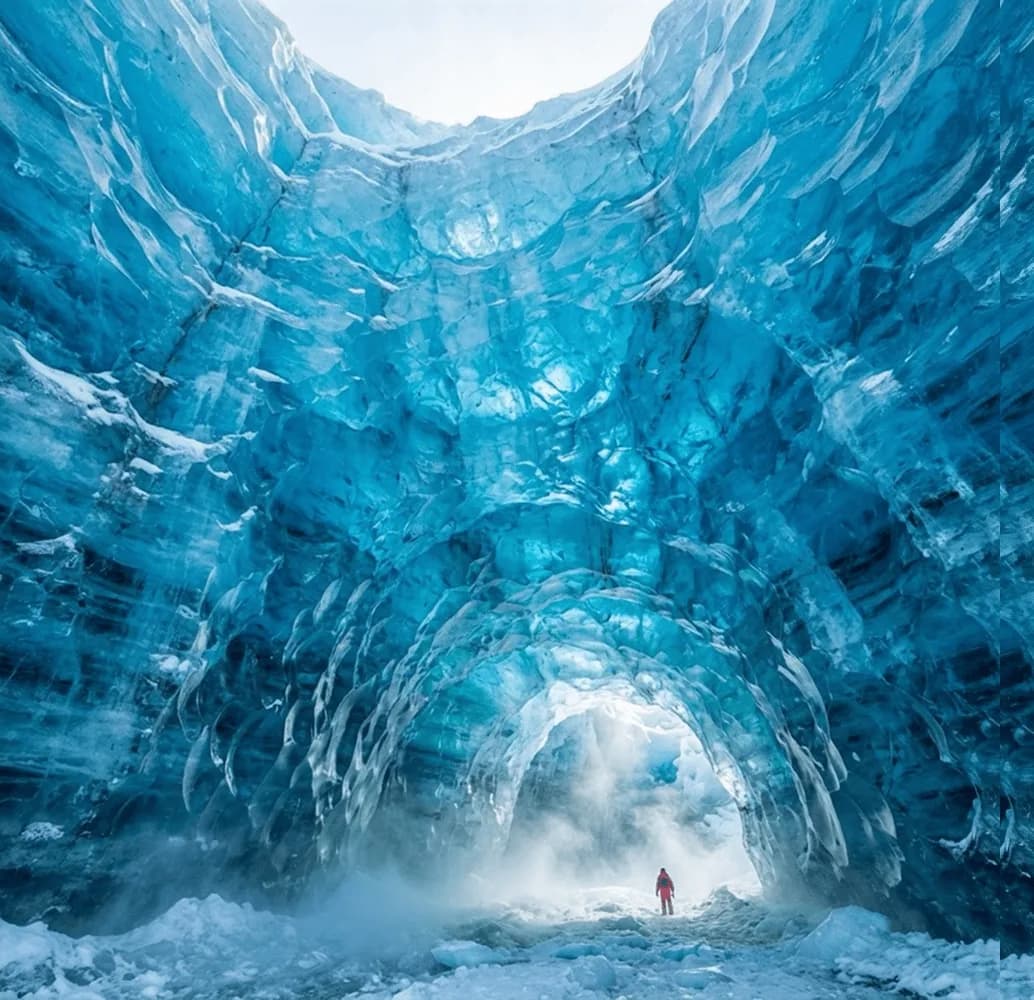
The first clause is the whole trick. "Like a cathedral interior" is not decoration — it is a compositional instruction disguised as a metaphor. A cathedral brings a vaulted ceiling, a nave that recedes, an arch, symmetry, and light entering from the far end. The output has all five, rendered in ice. Describing that layout literally would have taken thirty words and probably come out stiffer.
The second useful move is tiny human figure at base for scale. Scale is the thing image models most reliably lose, because nothing in a texture tells you how big it is. A named human reference at a named position fixes it in four words, and the red jacket in the output is doing more compositional work than any amount of "epic, massive, enormous."
The trailing terms — cinematic, cold mist in air, hyper-real detail — are atmosphere and render directives, and they come last for the same reason the style keyword did in lesson 1.
So the two prompts are not better and worse versions of each other. They are different tools:
| Use the long structured prompt when | Use the short stacked prompt when |
|---|---|
| Specific wardrobe, props, or brand details matter | You want one strong image and will iterate |
| Someone will check the output against a brief | The mood matters more than the inventory |
| You need to reproduce it later | You are exploring a look |
| Counts and colours are non-negotiable | A good analogy can carry the composition |
Lesson 3: in editing, one prompt should make one change
The MAI-Image-2.5 page demonstrates editing with three prompts, and what stands out is how small each one is:
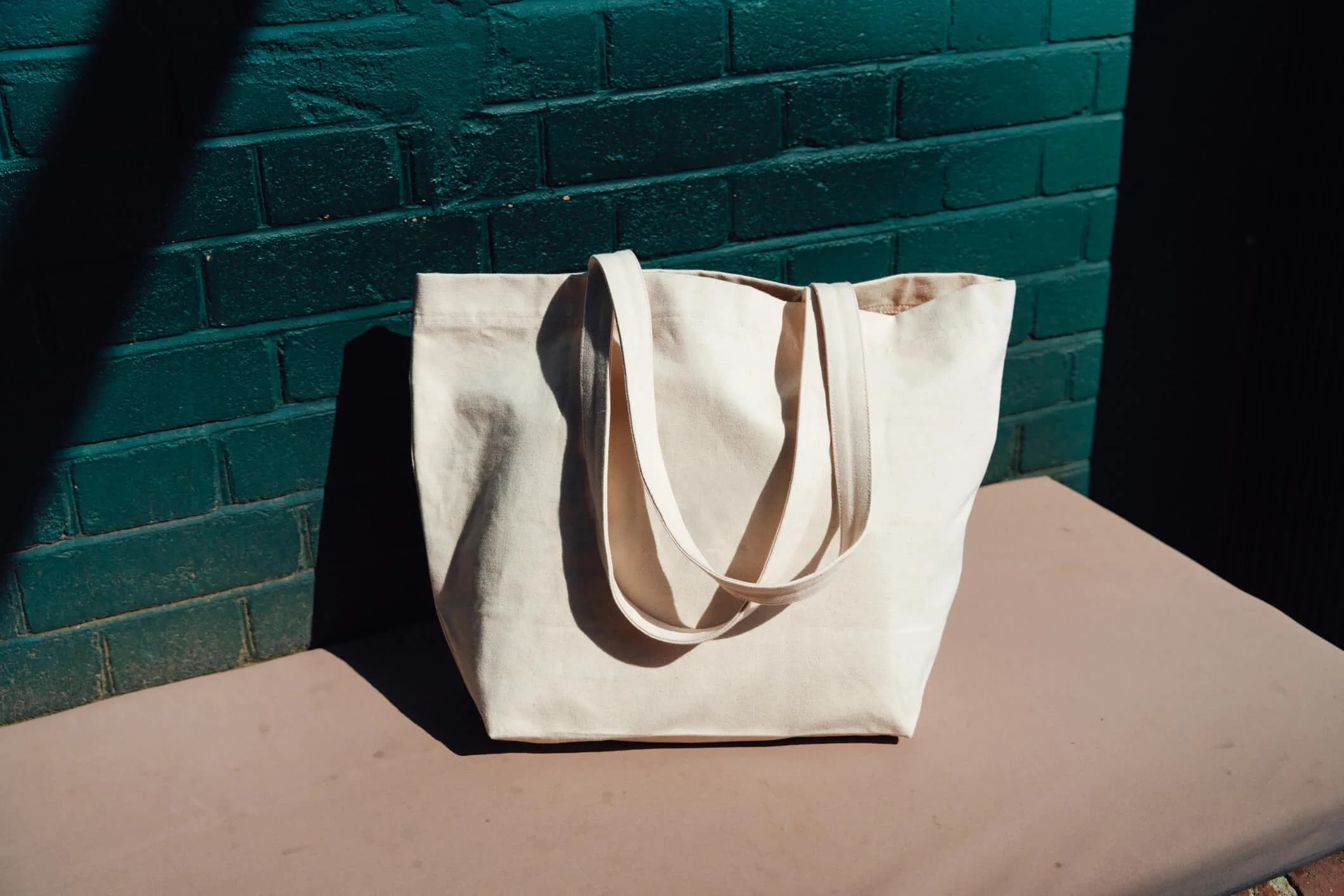
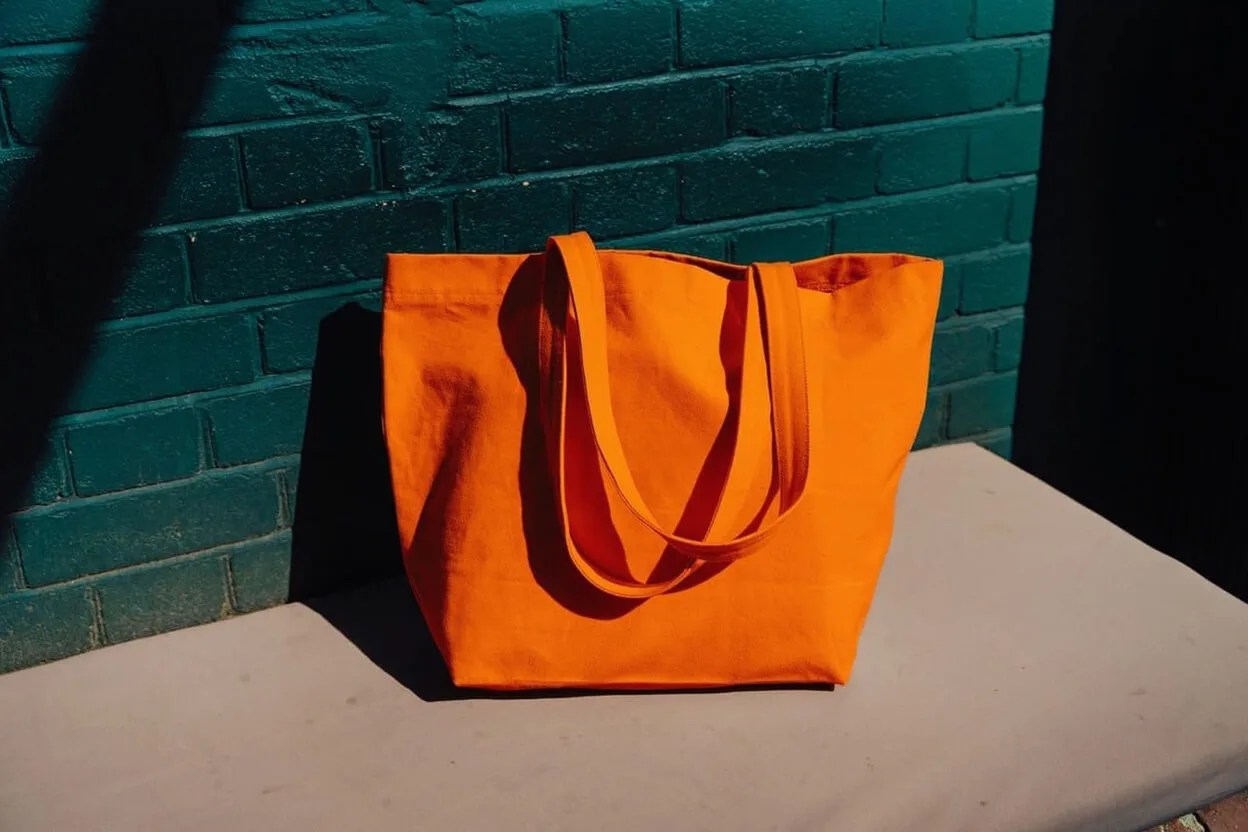
Change the tote color to orange
Add peonies peeking out the tote
Edit this image to have the woman walking through the streets of New York City
Here is the first one, before and after:


The prompt is six words: one verb, one named object, one target value. It does not also ask for a different background, a new angle, or better lighting. That restraint is the technique, because in an edit the model's hardest job is preservation, not change. Everything you add to the instruction is another thing it might decide to redo.
Notice too that the object is named. "The tote" gives the model an unambiguous referent. "Make it orange" leaves the model choosing between the bag, the table, and the wall.
The third prompt — relocating the subject to New York — looks like a much larger operation, and it is. But it is still one operation, and it still names what must persist: "the woman." A relocation prompt that also restyled her outfit and changed the time of day would give you no way to tell which instruction caused a bad result.
Warning
A chain of small edits is also a chain of small drifts. Re-check the details you care about after every step, not only at the end — skin tone, logo geometry, and text are the first things to quietly degrade across several passes.
Lesson 4: a cultural reference is cheap, and it only buys the scene
The shortest published prompt is eight words:
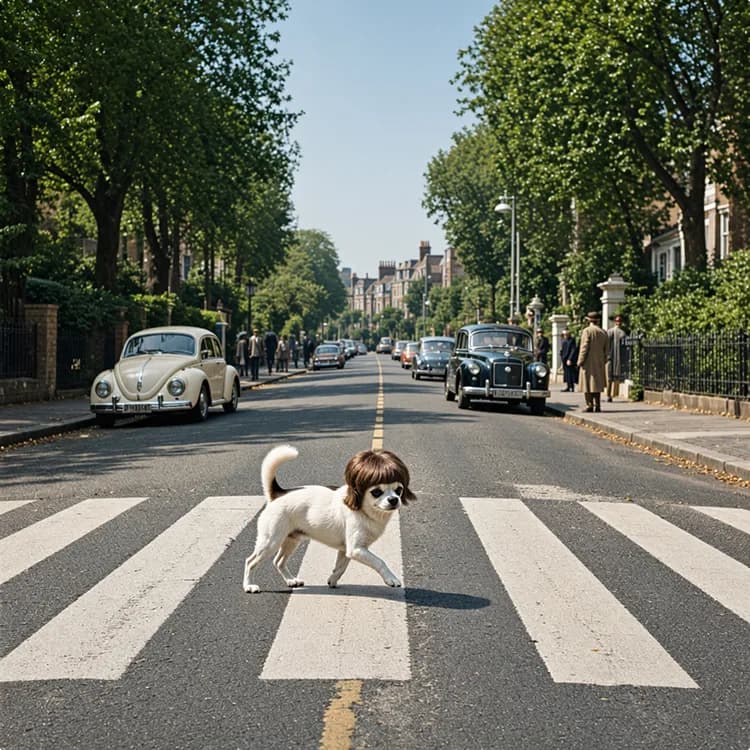
Chihuahua in Abbey Road album cover with moptop wig
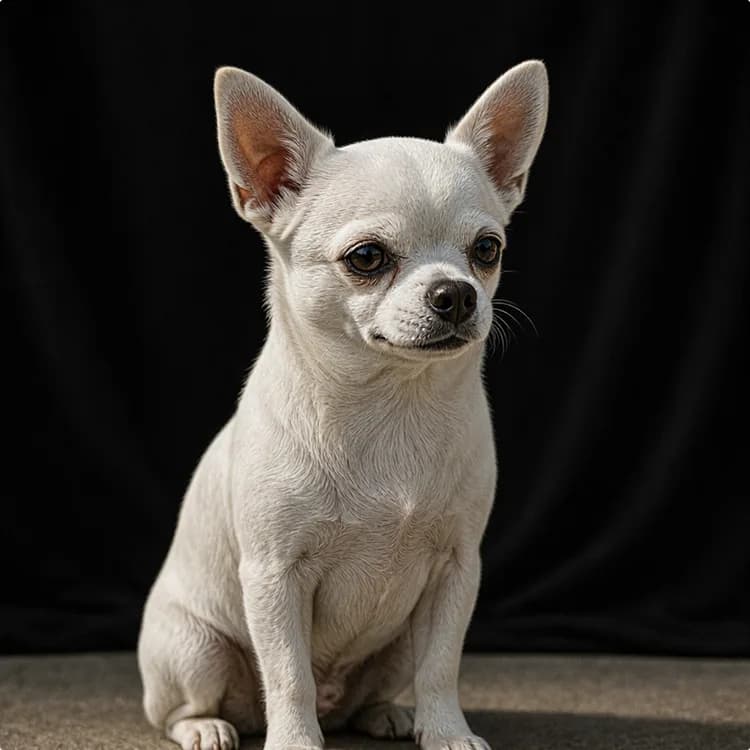

Eight words reconstruct a very specific scene: the zebra crossing, the receding tree-lined road, the white VW Beetle parked on the left, period cars, pedestrians in sixties coats, and the flat frontal framing. Writing that out longhand would take a paragraph and still probably miss the Beetle. Microsoft files this under "world knowledge and reasoning," and that is the right frame — a well-known reference is the most compressed prompt token available.
It is also the least controllable, and this example shows exactly where the limit sits. Compare the two images: the source is a cream, smooth-coated chihuahua with large upright ears against black. The output is a white-and-brown dog with a different coat, different proportions, and different ears. The reference bought the scene. It did not preserve the subject.
That distinction is the practical lesson. Reference shorthand is excellent for establishing a world — a genre, an era, a lighting convention, a layout. It is unreliable for identity. If a specific face, pet, product, or piece of packaging has to survive, that requirement belongs in explicit description or a reference-image workflow, not in a cultural allusion.
Two other caveats worth holding: a reference only works if the model has it, so obscure or regional references degrade silently into generic output, and famous imagery carries rights considerations that a prompt does not resolve for you.
Why text rendering became the headline number
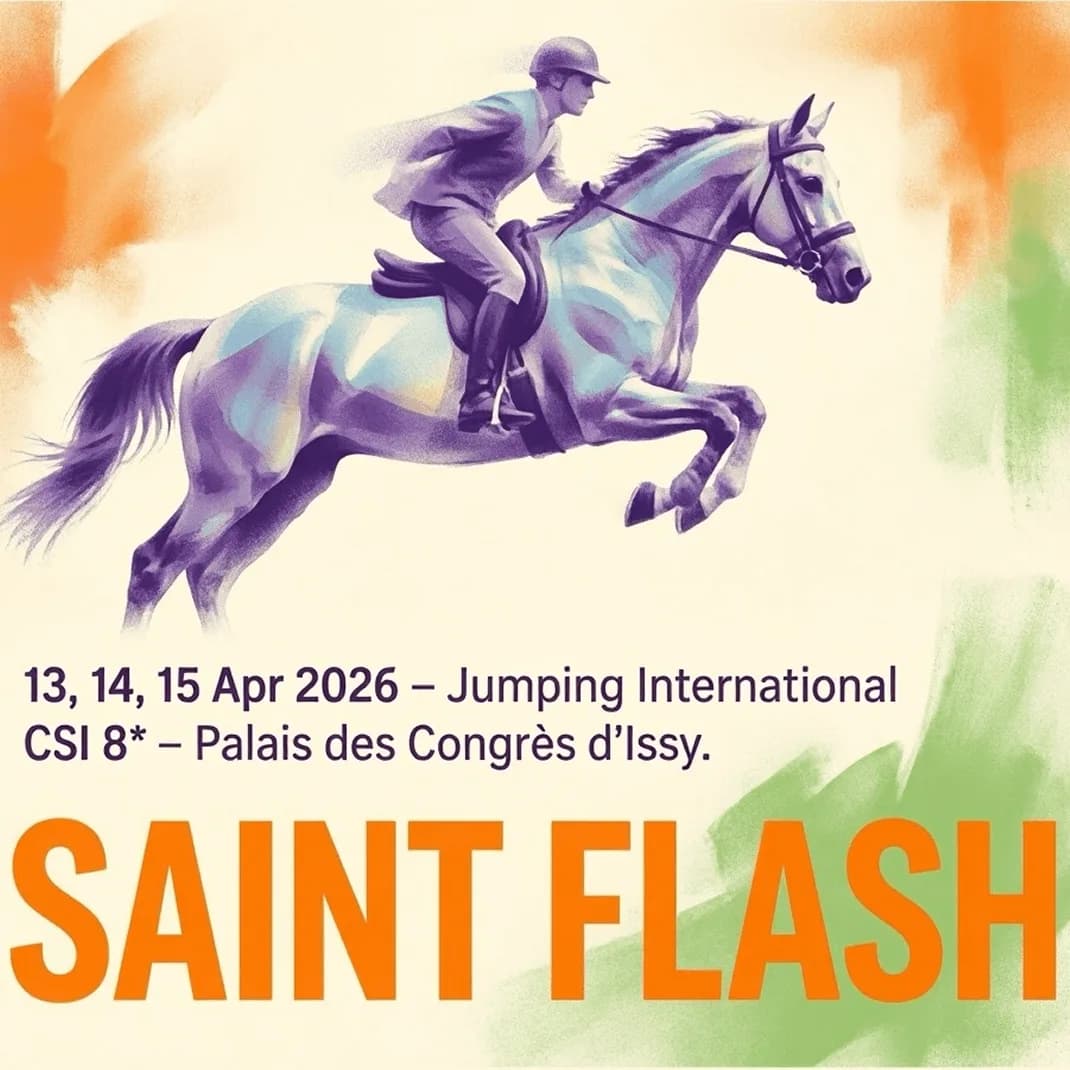
Of everything in the 2.6 announcement, the number Microsoft chose to break out separately was text: +91 Elo, above the +79 Elo overall gain. That is a deliberate emphasis, and the sample work explains why.

Spelling a headline correctly is the easy half. The poster above also holds an accented French place name, an asterisk in a rating, a comma-separated date list, and — most importantly — a hierarchy: date line subordinate, headline dominant, illustration given the top two-thirds. A model that spells perfectly but weights every text block equally still produces an unusable layout.
This is the part of image generation closest to paid work, which is why the partner quotes on the 2.5 page centre on it. WPP's global chief creative officer, Rob Reilly, singles out text accuracy as "a real breakthrough" alongside natural-language editing; Shutterstock's Vanessa Salvo frames the relevant metric as whether models "translate intent into consistent, production-ready outputs." Packaging, posters, menus, and campaign assets all fail on typography before they fail on photorealism.
What "No. 2 on Arena" does and does not tell you
Arena results are blind human preference comparisons, so a large Elo jump is a real signal that people preferred the outputs across a mixed prompt set. It is a genuine result, and +79 Elo in roughly two months is a fast climb.
It is also a single aggregate number. Microsoft's announcement does not publish per-category Elo values, confidence intervals, the size of the prompt set, or the identity of the model above it. As of August 14, 2026, several things a team would need before committing a pipeline are still unpublished:
- Per-image API pricing for the 2.6 tier
- Native and maximum output resolutions
- Generation and edit latency figures
- The multi-reference and grounding capabilities described as "coming soon"
- A technical report behind the Elo deltas
Note
An overall Arena rank cannot tell you whether a model is right for your specific job. Text-heavy packaging in a non-Latin script, a face that must repeat across twelve shots, and a transparent asset for a game UI are three different tests, and a model can lead the aggregate while losing any one of them.
The honest reading of 2.6 is narrow and still useful: Microsoft is iterating this family fast, and it is aiming the gains at commercial output — text, portraits, product, branding — rather than at spectacle.
Running these four patterns on OmniArt
MAI-Image is not currently available in OmniArt's image workspace. The prompt patterns are, and they are model-agnostic. Pick by which of the four jobs your brief actually is:
| The pattern | What it is for | A practical OmniArt starting point |
|---|---|---|
| Long structured prompt | Briefs where wardrobe, props, colours and counts are checked | GPT Image 2 |
| Short stacked prompt with a simile | Cinematic single images and mood exploration | Seedream 5.0 Pro |
| One-change-per-turn editing | Product colourways, additions, controlled relocation | Nano Banana 2 |
| Reference shorthand plus explicit identity | Scene-building where a subject must stay consistent | Seedream 5.0 Pro with references |
| Cheap iteration before committing | Testing prompt structure at low cost | Qwen Image |
A useful exercise: take the rooftop prompt above, run it unchanged, then run it again with the colours replaced by adjectives ("a pink bottle," "a green wand") and the count replaced by "some bubbles." The gap between those two outputs is the value of the structure, measured on your model rather than in a launch gallery.
For a current head-to-head on layout and photorealism, see GPT Image 2 vs Nano Banana 2. For reference-driven consistency, the Seedream 5.0 Pro launch guide covers its input and control surface, and the Qwen Image guide is the low-cost route for early drafts. For a comparable recent launch read, Grok Imagine Image 2.0 made a similar Arena claim in the same week.
FAQ
What is MAI-Image-2.6?
MAI-Image-2.6 is Microsoft AI's text-to-image model announced on August 10, 2026. Microsoft says it ranked second on the Arena text-to-image leaderboard, improving +79 Elo over MAI-Image-2.5, with text rendering improving +91 Elo.
How is MAI-Image-2.6 different from MAI-Image-2.5?
Microsoft describes gains in every measured Arena category, with specific emphasis on text rendering, portraits and 3D imagery, and more polished commercial and photorealistic output across product, branding and cinematic work. Multi-reference input, richer grounding, and more control over reasoning, format and resolution are described as coming, without published detail.
Where can I use MAI-Image-2.6?
Microsoft's announcement says it is available for text-to-image on Arena, arriving on MAI Playground later that week, and rolling out across Microsoft Foundry and other products.
Is MAI-Image available on OmniArt?
No. MAI-Image is not in OmniArt's image model picker. The prompt patterns in this article are model-agnostic and can be run on the image models OmniArt does offer.
What is the MAI-Image-2.5 model family?
Three variants: MAI-Image-2.5-Pro for object consistency and visual reasoning, MAI-Image-2.5 for high-quality generation with controllable editing, and MAI-Image-2.5-Flash, described as production-ready at less than half the price of the flagship model.
Do these prompt patterns work on other image models?
Yes. Named colours, explicit counts, a fenced-off background block, a scale anchor, one change per edit, and a compositional simile are all general prompting techniques. What differs between models is how reliably each one is honoured, which is worth testing on the model you actually use.
Getting started on OmniArt
Open the OmniArt image workspace and run one brief through two of the four patterns above — a long structured version and a short stacked version of the same idea. Keep the subject identical and change only the prompt form. That single comparison will tell you more about your model than any leaderboard position.
From there, treat editing as separate work: approve one image, then make one change per prompt and check the details you care about after each pass. OmniArt keeps image, video, audio, and music models in one workspace, so an approved still can move straight into motion without changing tools — and when a new model earns its place in the picker, the prompts you have already learned to write come with you.
Ready to create?
Start generating amazing content with AI