GPT Image 2 vs Nano Banana 2: which AI image model in 2026?
GPT Image 2 vs Nano Banana 2 — identical prompts, six rounds, side-by-side results, and pricing for both. A practical buying guide for OmniArt creators.
GPT Image 2 and Nano Banana 2 are the two AI image models most teams are choosing between in 2026. Both are available in OmniArt's image workspace, both are fast, and both are good — but they're good at different things. Picking the right one for the job (and knowing when to use both) is the meaningful question, not which one wins in the abstract.
We ran identical prompts through both models across six categories: comic storyboard, educational infographic, human portrait, character headshot, impossible architecture, and product photography. Below are the side-by-side results, scoring rubric, pricing breakdown, and a scenario-based buying guide.
The bottom line
For teams working in 2026, GPT Image 2 is the safer default when the image must carry accurate text, ordered steps, or tight layout control — comics, infographics, UI-ish mocks. Nano Banana 2 is the safer default when the image must feel photographic — portraits, cinematic scenes, and many product hero frames.
| Use case | First pick |
|---|---|
| Best for text inside images | GPT Image 2 |
| Best for photorealism | Nano Banana 2 |
| Best for product hero shots | Nano Banana 2 |
| Best for infographics | GPT Image 2 |
| Best for high-volume testing | Depends on price-per-accepted-image, not list price |
What the two models actually are
GPT Image 2 is OpenAI's latest image model, built on an autoregressive single-pass architecture — it generates images token-by-token, similar to how GPT generates text. That design gives it strong prompt adherence and notably reliable text rendering inside images.
Nano Banana 2 is Google's image model on the Gemini stack — a native multimodal route tuned for fast, high-throughput generation and editing-style workflows, with photorealism and natural lighting as its strengths.
| Spec | GPT Image 2 | Nano Banana 2 |
|---|---|---|
| Developer | OpenAI | Google DeepMind |
| Architecture | Autoregressive (single-pass) | Native multimodal |
| Generation speed | 3–5s | 2–5s |
| Text rendering | 99%+ accuracy | Good for short strings |
| Max resolution | Up to 4096×4096 | Up to ~4096×4096 |
| Best for | Precision layouts, text-heavy designs | Photorealism, cinematic visuals |
| Available on OmniArt | Yes | Yes |
How we tested
Same prompt text. Same workspace. Comparable generation settings for each model. No secret tweaks between runs. We scored prompt matching, text usability, layout adherence, photographic believability, and retouching-time savings across six domains: comic storyboards, educational infographics, human portraits, character headshots, impossible architecture, and commercial product photography.
Note
The point isn't to crown a winner. It's to map each model's architectural strengths to the kinds of jobs you're actually trying to do.
Round 1: comic storyboard — GPT Image 2 wins on layout control
Prompt: A 2×3 grid comic strip following a golden retriever's chaotic Monday — sleeping peacefully, stealing coffee, wearing a necktie at a laptop, joining a cat video call, stealing a shoe, and waking from a dream.
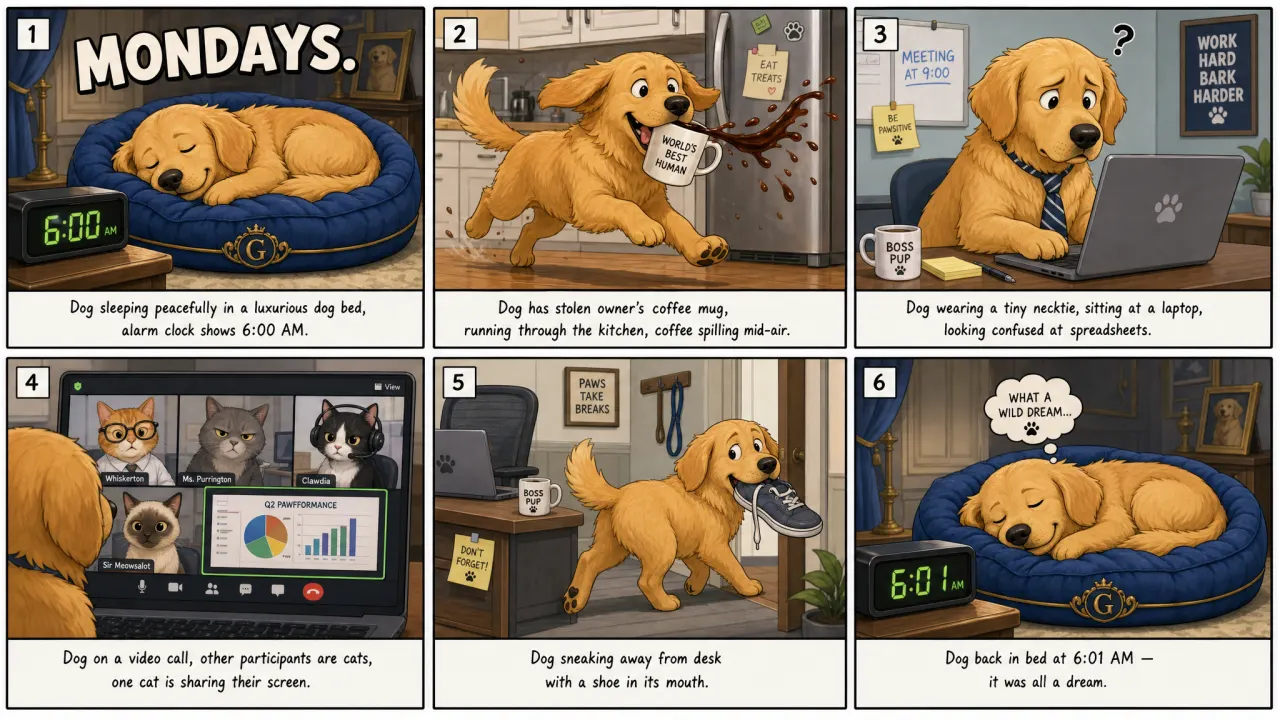
GPT Image 2 follows the requested 2×3 structure with a clean panel layout, correct story sequence, and readable text. "MONDAYS." is spelled correctly, clocks display 6:00 AM and 6:01 AM, and captions are mostly coherent. The main limitation is that prompt text is reproduced literally under panels rather than rewritten as natural comic captions.
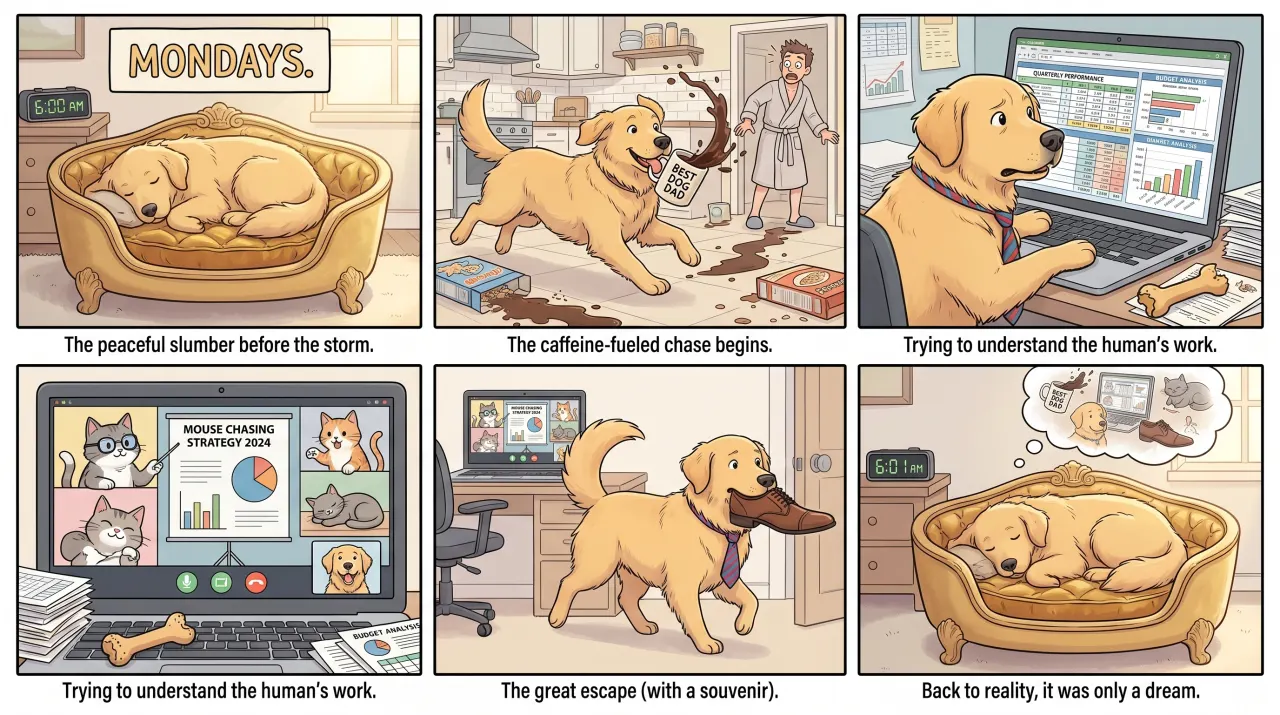
Nano Banana 2 produces warmer, more visually charming artwork with softer personality and a friendlier illustration style. It's less faithful to the exact prompt requirements — title placement is imprecise, the video-call panel repeats an earlier caption, and the ending is more loosely interpreted.
Verdict. GPT Image 2 wins for prompt adherence, panel structure, and text. Nano Banana 2 makes a more charming illustration but sacrifices layout accuracy.
Round 2: educational infographic — GPT Image 2 wins on text accuracy
Prompt: A clean modern educational infographic titled "How Wi-Fi Actually Works" with a white background showing a 5-step process — router emitting radio waves, waves passing through a wall, laptop antenna receiving signal, binary data packets traveling along the wave, and cat video loading. Flat vector style, soft shadows, pastel colors.
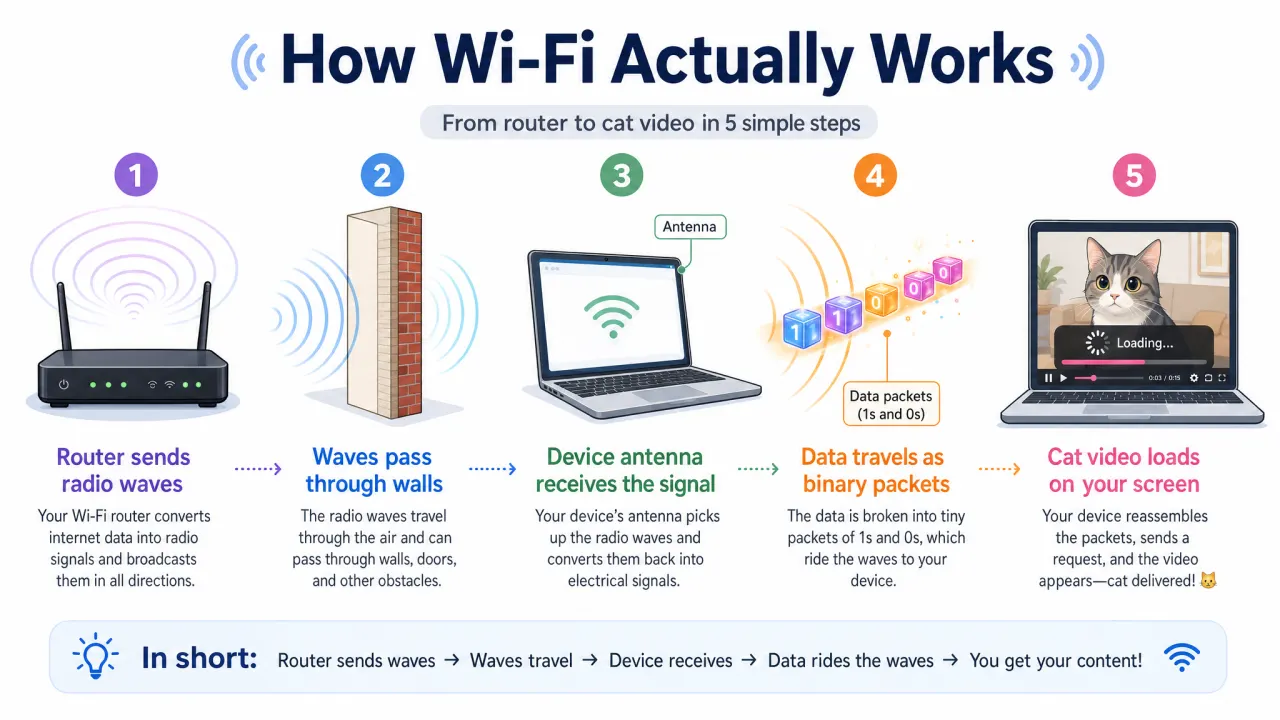
GPT Image 2 produces a publication-ready infographic with correct title spelling, a clear five-step sequence, and accurate labels matching the prompt. An additional "in short" strip summarizes the process. Minor issues: slightly dense "Data packets (1s and 0s)" labeling and a redundant laptop icon, but spelling, hierarchy, and visual flow are strong.
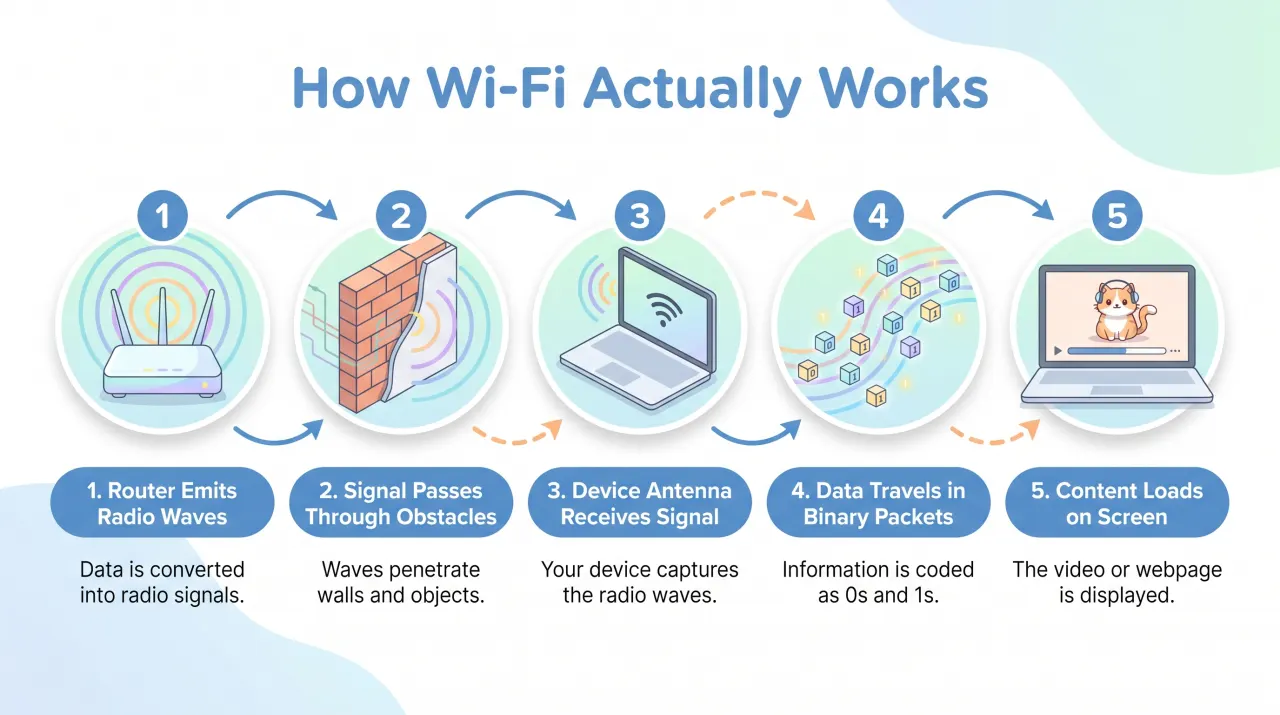
Nano Banana 2 produces a cleaner, softer design with pleasant pastel colors and rounded icon containers — visually accessible and easy to scan. It drops the cat-video specificity into a generic "content loads on screen," gives a thinner technical explanation, and treats the wall step more decoratively than instructionally.
Verdict. GPT Image 2 wins on text accuracy and instructional value. Nano Banana 2 wins on visual softness but simplifies the prompt more aggressively.
Round 3: human portrait — Nano Banana 2 wins on realism
Prompt: Candid street photograph of a 70-year-old Japanese fisherman sitting on a weathered wooden dock at golden hour, wearing a faded indigo work jacket and towel around his neck. Deep laugh lines, slight smile, mending a fishing net. Blurred harbor background with small boats and warm orange backlight on gray hair. 85mm lens, shallow depth of field, natural film grain, Fujifilm X-T5 color science, no retouching.
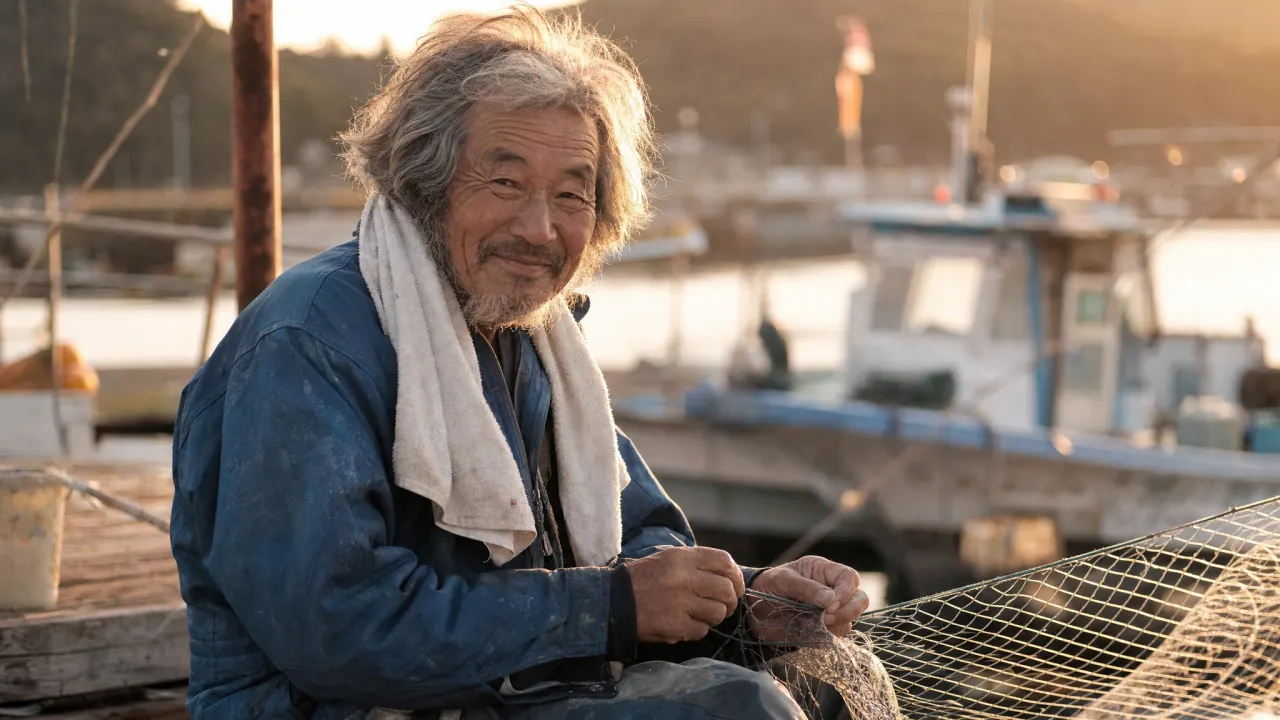
GPT Image 2 produces a very strong documentary-style portrait with all requested elements aligned: weathered dock, faded work jacket, towel, fishing net, harbor background. The face is expressive, with convincing laugh lines, uneven gray hair, and warm backlighting that creates a lived-in feeling. The main issue is that the subject looks directly into the camera, reducing the "candid" quality and feeling more posed.
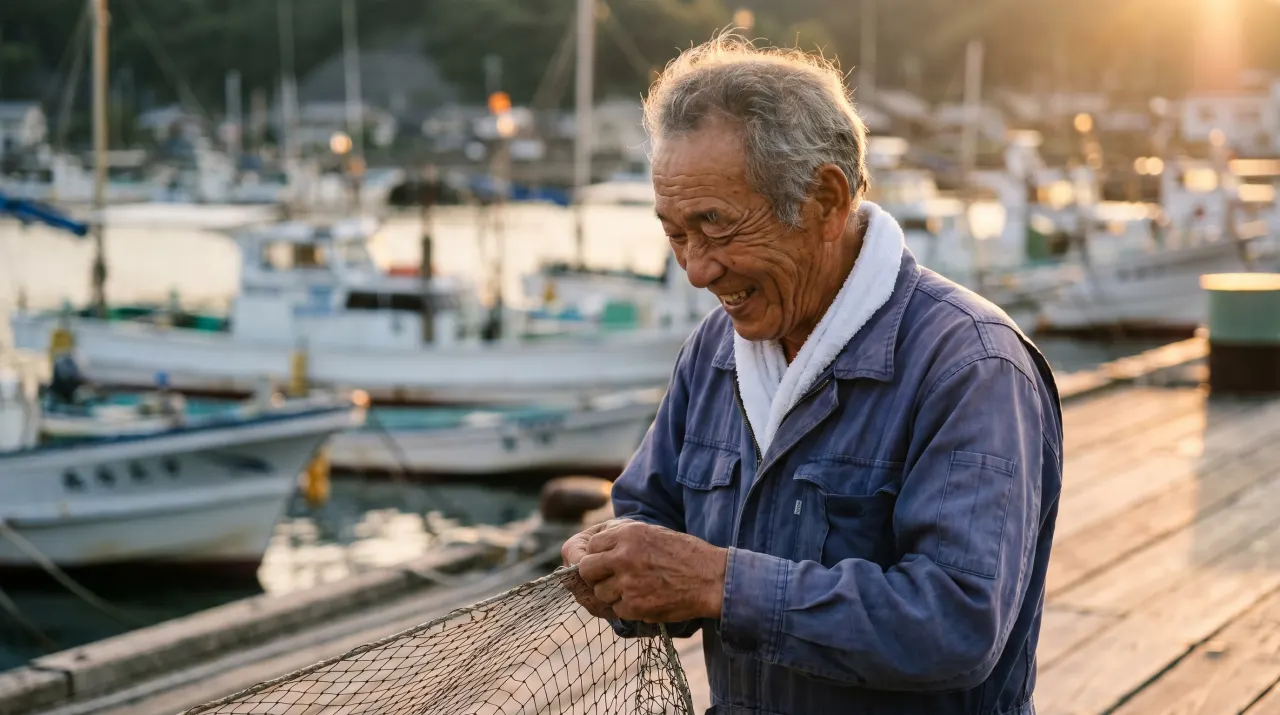
Nano Banana 2 is more faithful to the action — the fisherman is actively mending the net, the harbor setting is clearer, and the side-profile smile feels naturally captured. The lighting is cinematic without appearing overly staged, and background boats create a strong sense of place. Skin texture is slightly smoother than GPT Image 2, but the hands interacting with the net make the image more useful for the prompt's intended story.
Verdict. Nano Banana 2 wins by a narrow margin. GPT Image 2 gives a stronger face-forward portrait, but Nano Banana 2 better captures the candid working moment described.
Round 4: character headshot — Nano Banana 2 wins on photographic finish
Prompt: Professional corporate executive portrait of a large, friendly green-skinned ogre with distinctive trumpet-shaped ears. Tailored navy suit, crisp white shirt, silk burgundy tie. Studio lighting, neutral gray background. Warm confident smile, slight teeth. Polished skin texture. Fortune 500 executive headshot style, cinematic lighting.
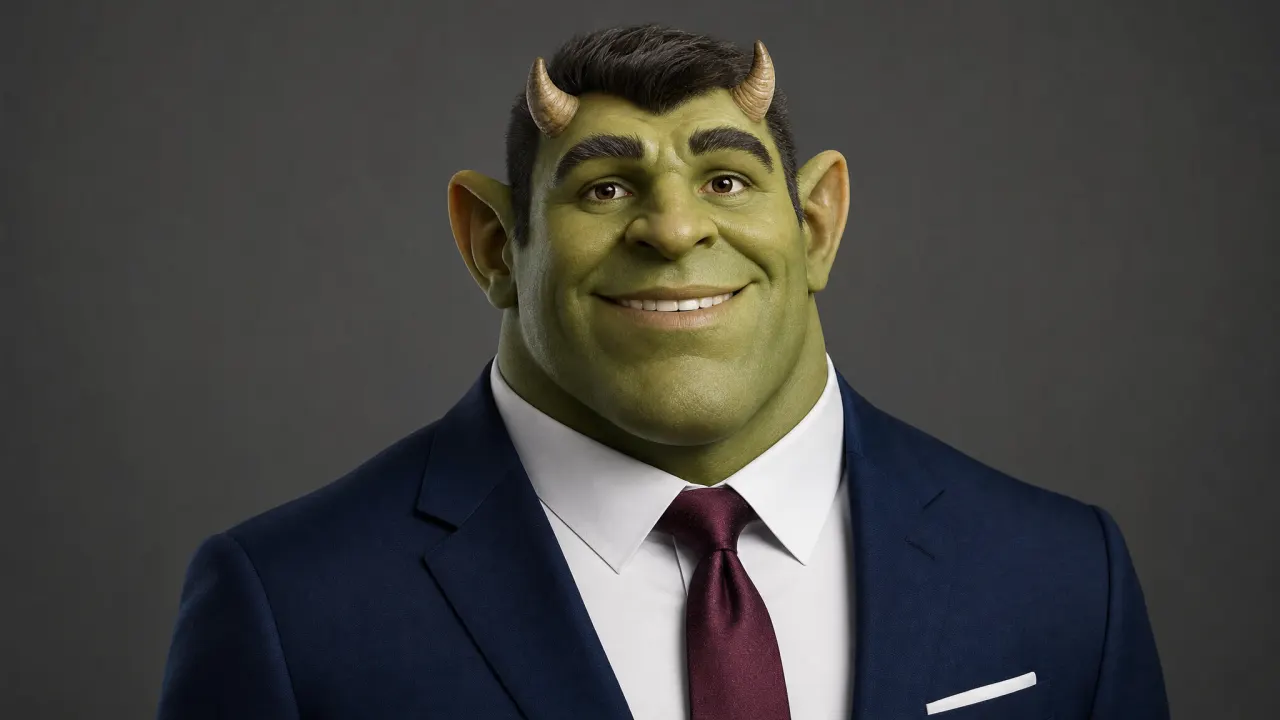
GPT Image 2 creates a friendly executive portrait with strong facial expressiveness. Suit, white shirt, and burgundy tie match the prompt; the gray studio background fits a corporate headshot brief. The character reads as approachable rather than monstrous. Main mismatch: the ears appear as small horns and human-like rather than trumpet-shaped, and an unexpected hairstyle is introduced.
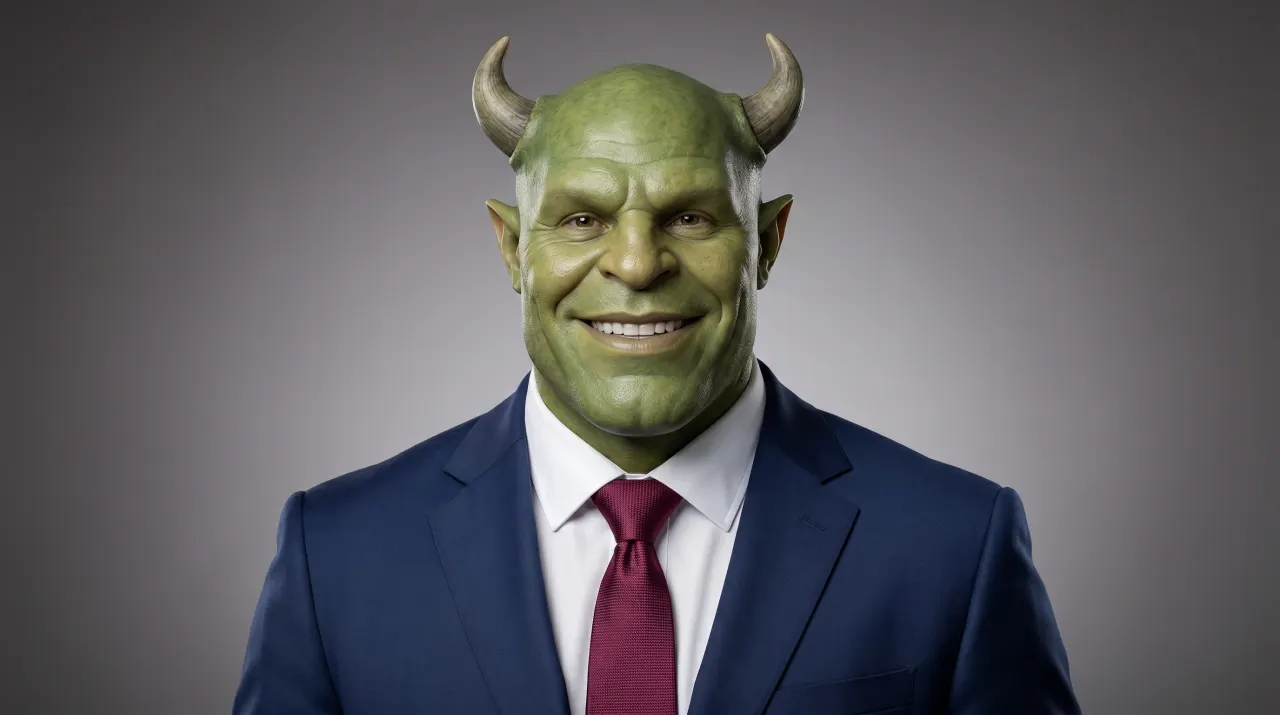
Nano Banana 2 produces a more realistic studio portrait with better pore-level skin detail, more natural suit fabric, and a stronger photographic finish. The subject feels like a real actor in prosthetic makeup rather than digital illustration. It still doesn't fully satisfy the trumpet-shaped ear requirement, but it better delivers the intended Fortune 500 executive look.
Verdict. Nano Banana 2 wins for photographic realism and executive-portrait quality. GPT Image 2 wins on warmth and personality, but Nano Banana 2 better executes the intended use case.
Round 5: impossible architecture — Nano Banana 2 wins on usable realism
Prompt: Award-winning architectural photograph of a building that cannot exist in reality — a 30-story residential tower where each floor is rotated exactly 3° clockwise from the floor below, creating a gentle spiral. White concrete and floor-to-ceiling glass. Stands alone on a calm reflecting pool in a misty Nordic landscape at dawn. Reflection in the water shows the spiral clearly. Tiny warm lights glow from about 40% of apartments. A single person in a red coat walks along the pool edge for scale. Tilt-shift lens, architectural photography style.
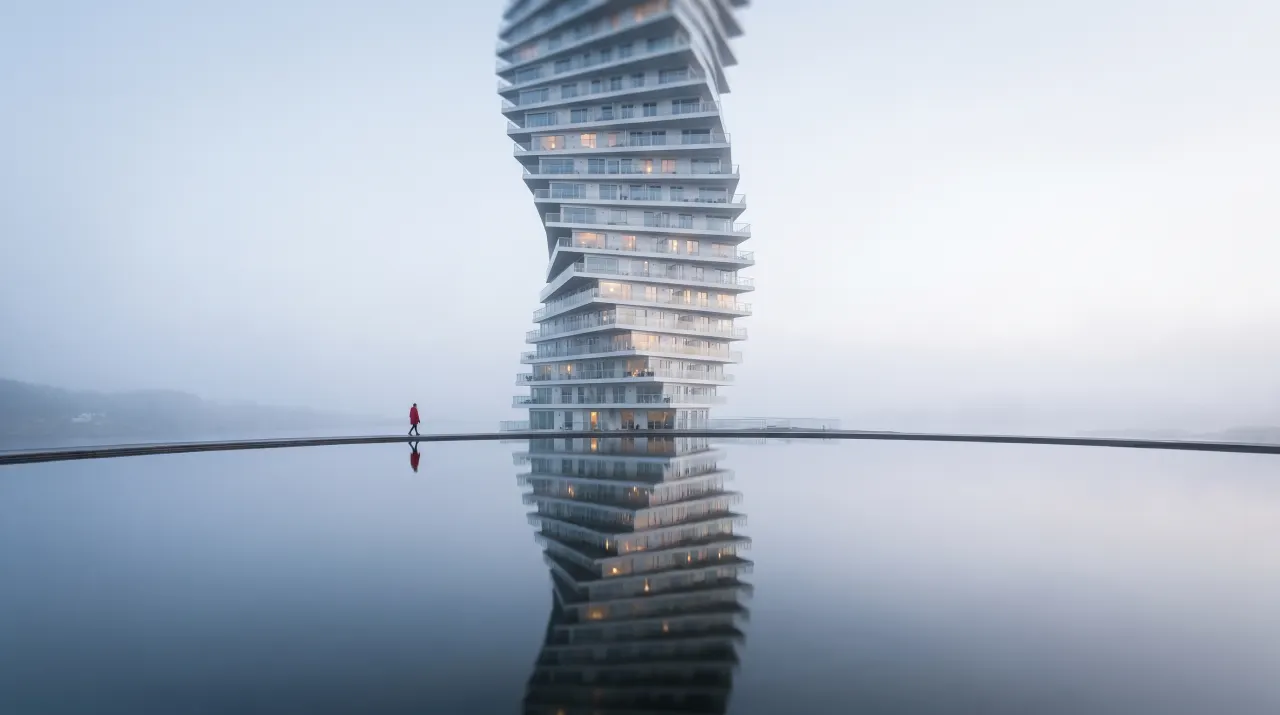
GPT Image 2 clearly understands the twisting tower concept — upper floors rotate dramatically, the reflecting pool is present, and a red-coated person provides scale. The misty Nordic mood is effective with the cold, quiet atmosphere fitting the prompt. Weakness: structural inconsistency — the top half twists more aggressively than the bottom, creating a sculptural tower rather than a steady 3° rotation. The water reflection doesn't fully mirror the spiral.
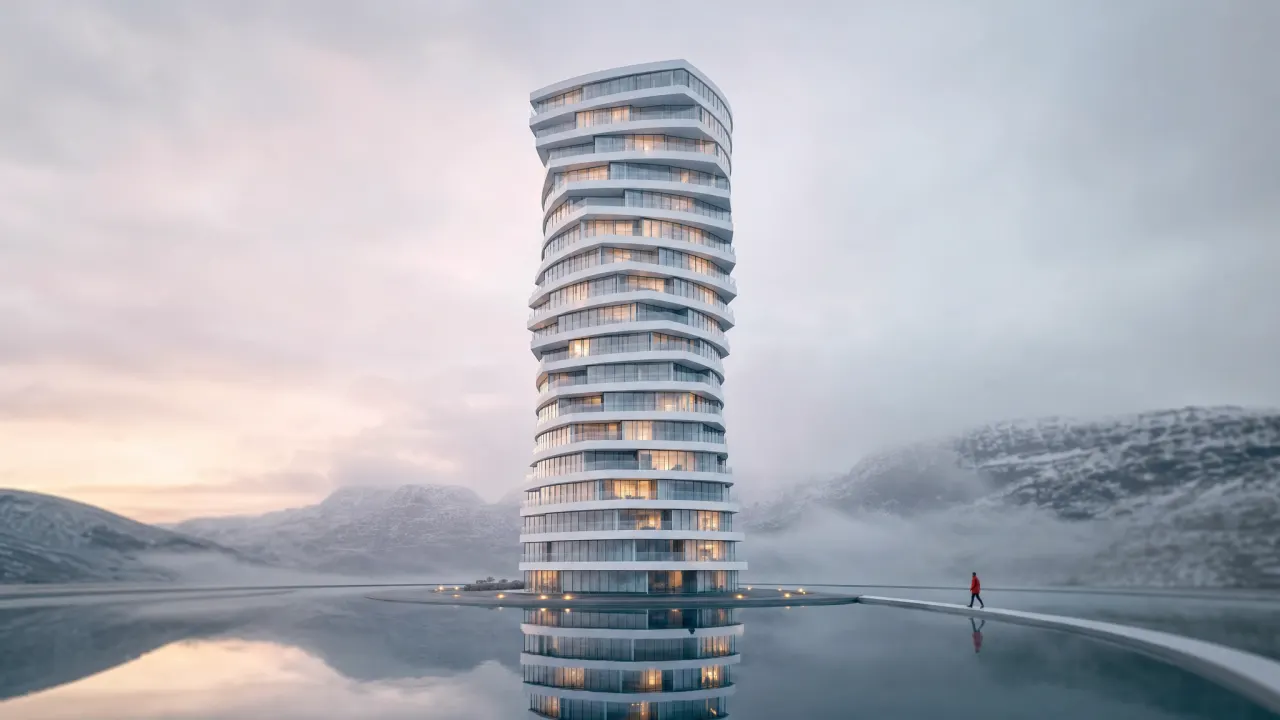
Nano Banana 2 produces a cleaner, more believable architectural photograph — the tower feels physically buildable. White concrete and glass facade are more consistent, the reflecting pool behaves more naturally, the person in red is placed cleanly for scale, and the surrounding landscape has stronger photographic realism. Trade-off: it softens the "impossible" requirement by choosing realism over exact geometric oddity.
Verdict. Nano Banana 2 wins for usable architectural visualization and reflection realism. GPT Image 2 is more conceptually dramatic but less controlled.
Round 6: product photography — split decision
Prompt: Hyper-realistic luxury sneaker advertisement with a single white athletic sneaker floating at a slight angle above a glossy wet obsidian surface, reflecting neon pink and electric blue studio lights. Tiny water droplets suspended mid-air around the shoe. Background: deep charcoal gradient with subtle fog. Dramatic rim lighting. Bold "JUST DROPPED" text overlay in condensed uppercase geometric sans-serif. Commercial product photography, no other objects.
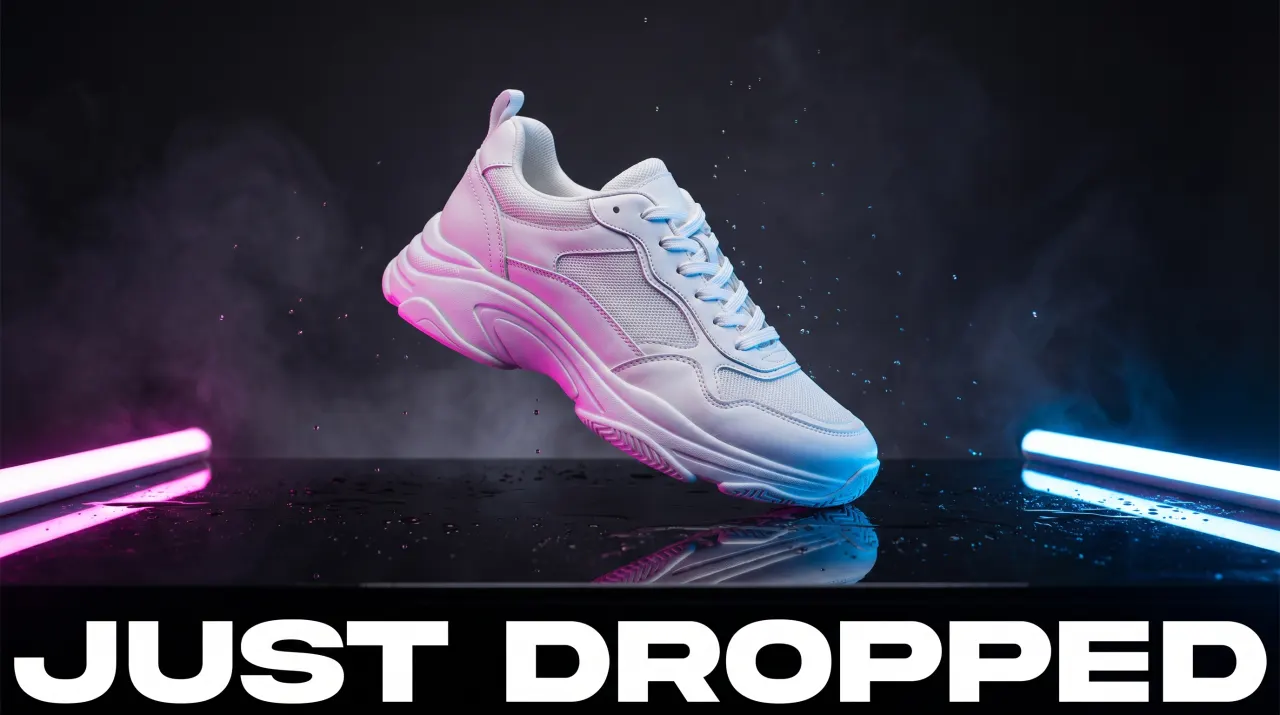
GPT Image 2 pushes a maximalist launch look — chunky white athletic silhouette, mesh and synthetic panels rim-lit hard from pink and cyan sides. The mirror-wet plane throws a clean reflection; fine droplets hang in air picking up both colors. Background features soft volumetric haze for a high-end streetwear spot feel. "JUST DROPPED" spans the bottom as a wide heavy sans band with correct spelling and strong contrast. Trade-off: closer to a smoky neon stage than a restrained catalog setup; sole volume reads more statement-footwear than slim runner.
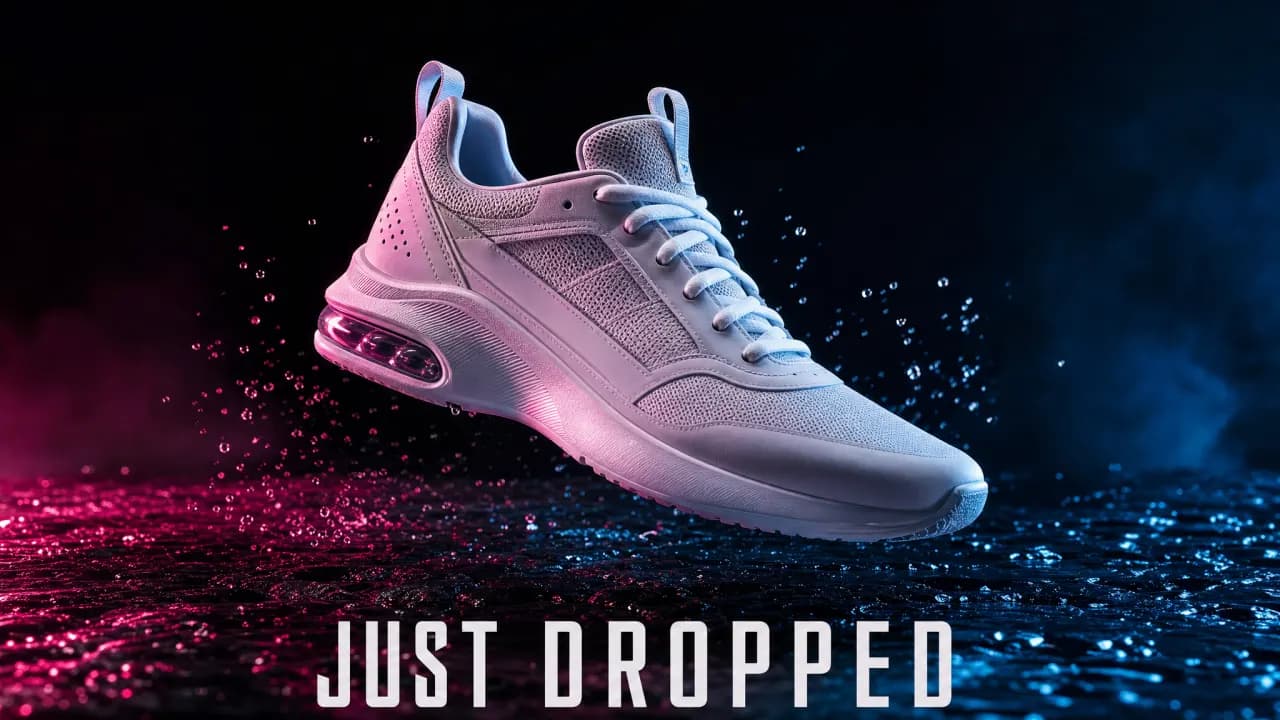
Nano Banana 2 reads more like a product hero for retail — slimmer upper, clearer mesh layering, translucent cushioning element at the heel reading under cross-light. The pink and blue studio light stays dramatic, but the background stays darker, keeping the shoe as the focal weight. The ground looks like wet asphalt with spray frozen mid-air, selling motion without turning the entire frame into a poster. "JUST DROPPED" stays legible but isn't billboard-wide; overall mood is less neon club, more athletic PDP.
Verdict. GPT Image 2 wins on theatrical scale, haze, and headline width. Nano Banana 2 wins on footwear-structure clarity and grounded wet-surface product shot. Choose GPT Image 2 for the loudest launch still; choose Nano Banana 2 when the shoe needs to read as an SKU-grade hero.
What the tests show
GPT Image 2 behaves more like a layout-aware design assistant. Nano Banana 2 behaves more like a fast visual photographer. The split is consistent across rounds.
GPT Image 2 was more reliable when prompts required exact structure: comic panels, ordered steps, readable labels, and large on-image text. For work that lives in the territory of design production — posters, infographics, mockups, storyboards, labeled diagrams — GPT Image 2 gives you more control.
Nano Banana 2 was stronger when prompts depended on visual realism: portraits, architectural scenes, and product shots with cleaner detail. It tends to simplify complex instructions, but the results often look more natural and immediately usable. For campaign imagery, lifestyle visuals, product photography, and editorial work, Nano Banana 2 is easier to recommend.
Pricing and value
API list pricing
GPT Image 2 charges per generated image by quality and size:
| Quality | 1024×1024 | 1536×1024 | 1024×1536 |
|---|---|---|---|
| Low | $0.006 | $0.005 | $0.005 |
| Medium | $0.053 | $0.041 | $0.041 |
| High | $0.211 | $0.165 | $0.165 |
Nano Banana 2 bills image output as tokens ($60 per 1M image tokens on standard tier), which works out to:
| Output size | Standard / image | Batch / image |
|---|---|---|
| 0.5K (~512 px) | $0.045 | $0.022 |
| 1K (~1024×1024) | $0.067 | $0.034 |
| 2K (~2048×2048) | $0.101 | $0.050 |
| 4K (~4096×4096) | $0.151 | $0.076 |
Reading the table. GPT Image 2's low tier is the cheapest entry point for quick drafts. At medium quality on a 1024×1024 square, GPT Image 2 ($0.053) is in the same ballpark as a 1K Nano Banana 2 still ($0.067 standard). At high quality, GPT Image 2 costs substantially more per square image.
Platform pricing
Inside OmniArt, you spend credits in one account rather than reconciling separate OpenAI and Google Cloud bills. The number to optimize is cost per accepted asset (including retries), not the API row for a single size. Promotions and included usage shift back-of-napkin API math for day-to-day work.
What the community says
Conversation in creator threads on Reddit clusters around recurring themes:
- "GPT Image 2 finally renders text correctly." Users celebrate 99%+ accuracy for English text inside images.
- "Nano Banana 2 just looks more real." Portrait and landscape comparisons consistently favor Nano Banana 2 for photorealism — described as "cinematic" without post-processing.
- "Neither handles complex layouts reliably." Both models still struggle with very specific spatial instructions and precise element positioning.
- "The speed difference matters more than you think." Nano Banana 2's faster response compounds into real time savings for iterative workflows generating 20–30 variants.
The consensus aligns with the test results: there's no universal winner. Designers prioritize text and layout; photographers prioritize realism; social creators prioritize speed and scroll-stopping aesthetics; developers prioritize pricing and predictable outputs.
Which model should you choose?
Choose GPT Image 2 for design-led workflows
GPT Image 2 is better when the image needs to communicate structured information. If it includes a headline, UI labels, diagram steps, menu text, captions, callouts, or multiple panels, GPT Image 2 is usually easier to control.
Especially useful for:
- Graphic designers — posters, campaign key visuals, social graphics with readable copy
- Product marketers — infographics, explainers, comparison visuals, launch announcements
- UX/UI designers — dashboard mockups, app screens, layout concepts
- Educators and bloggers — diagrams where labels must be understandable
- Storyboard artists — multi-panel concepts before moving into video production
In these workflows, a beautiful image with misspelled text is often unusable.
Choose Nano Banana 2 for photo-led workflows
Nano Banana 2 is better when the image needs to feel like a polished photograph. It tends to render more natural light, more convincing skin, smoother product surfaces, and better environmental atmosphere.
Especially useful for:
- E-commerce sellers — product hero shots, lifestyle scenes, catalog visuals
- Social media creators — fast, polished images for trend-driven posts
- Brand marketers — cinematic campaign visuals, portraits, lifestyle assets
- Photographers and art directors — lighting exploration, mood boards, editorial directions
- Small businesses — attractive images quickly without heavy prompt tuning
In these workflows, the winning image is the one ready to publish with the least editing.
Choose by scenario
| Scenario | First pick | Why |
|---|---|---|
| Social post with bold text | GPT Image 2 | Better typography and fewer spelling errors |
| Product page hero | Nano Banana 2 | Stronger material realism and lighting |
| Educational infographic | GPT Image 2 | More reliable labels and step structure |
| Human portrait | Nano Banana 2 | More natural scene and photographic mood |
| Comic strip / storyboard | GPT Image 2 | Better panel discipline and sequence control |
| Architecture mood board | Nano Banana 2 | More realistic environment and reflection handling |
| Meme or character mashup | Depends | GPT Image 2 for text, Nano Banana 2 for realism |
| High-volume ideation | Depends | Compare cost per accepted image, including retries |
| Final campaign visual | Either | Choose based on whether realism or layout matters more |
Choose by budget
Experimenting with GPT Image 2 can be cheaper because the low tier is inexpensive — attractive for fast drafts and early creative directions. But the low tier may not hold up for final production. On the API side, Nano Banana 2 scales predictably by output resolution; for product photography or mood boards, fewer retries can outweigh a cheaper list price.
For most teams, the most cost-effective approach isn't picking one model permanently. Use GPT Image 2 for layout/text-heavy drafts. Use Nano Banana 2 for photoreal hero visuals. Keep both inside one workspace.
Use both on OmniArt when the workflow shifts by asset type
Real campaigns rarely fit one model's strengths. A launch might need:
- A photoreal product hero
- A text-heavy comparison graphic
- A six-panel storyboard for video planning
- Social media variants with short slogans
- A video version of the best image
Inside OmniArt, you can test both models side by side, keep the stronger output, and move into video — without rebuilding the asset pipeline elsewhere. Switching models becomes part of the creative process instead of a procurement decision.
FAQ
Is GPT Image 2 better than Nano Banana 2?
Neither is universally better. GPT Image 2 leads in text rendering accuracy (99%+), structural control, and complex multi-element compositions. Nano Banana 2 leads in photorealism, cinematic lighting, and generation speed.
Can Nano Banana 2 render text inside images?
Yes, but with limits. Nano Banana 2 handles short strings and titles reasonably well, but accuracy drops for longer text, multiple text elements, or non-Latin scripts. GPT Image 2 is significantly more reliable for text-heavy generation.
Which model is faster?
Nano Banana 2 typically generates in 2–5 seconds. GPT Image 2 takes 3–5 seconds at comparable settings. The per-image difference is small but compounds over high-volume workflows.
Which model is cheaper?
It depends on quality tier vs output size. GPT Image 2 low at 1024×1024 ($0.006) undercuts a 1K Nano Banana 2 still (~$0.067 standard, ~$0.034 batch). At medium ($0.053 vs ~$0.067), the two are close for 1K square. At high ($0.211 vs ~$0.067 for 1K), GPT Image 2 is much more expensive per comparable square output.
Can I use both models on OmniArt?
Yes. Both GPT Image 2 and Nano Banana 2 are available in OmniArt's image workspace. You can test the same prompt on both inside one workspace using one credit balance.
Which is better for e-commerce product photography?
For pure product realism and material rendering, Nano Banana 2 typically produces more commercially ready output. For product layouts that include text (pricing, labels, feature callouts), GPT Image 2 is more reliable. Many e-commerce workflows use both.
Conclusion
After running identical prompts through both models, the comparison isn't about crowning a winner — it's about understanding where each model's architecture gives it a real advantage.
GPT Image 2's autoregressive approach makes it a structural thinker. It understands what goes where, renders text like a typographer, and follows complex spatial instructions with uncommon precision. For work that lives in design systems, infographics, multi-panel layouts, or anything requiring words inside images, it's the more reliable tool.
Nano Banana 2's native multimodal architecture makes it a visual realist. It renders light, skin, and materials with quality that looks less like AI output and more like a photograph from a skilled camera operator. For portraits, product photography, cinematic scenes, or anything where "does this look real" is the bar, it delivers consistently.
The strongest workflow in 2026 isn't picking one model. It's having access to both and routing each generation to the model that matches the task. On OmniArt, that routing happens in one click — generate a photoreal hero with Nano Banana 2, then produce matching text-overlay social variants with GPT Image 2, then animate the hero into video. One workspace, multiple models, no context-switching tax.
For more on writing prompts that hold up across models like these, see our guide to writing better prompts. For the video-side companion, see our take on the BACH AI video generator.
Getting started on OmniArt
Try both. Let the prompt decide. Open OmniArt's image workspace, drop in a brief, and run it through GPT Image 2 and Nano Banana 2 side by side. The model that wins for your job is the one that gets to "ready to publish" with the least back-and-forth.
Ready to create?
Start generating amazing content with AI