FLUX 3 explained: what actually shipped, and what didn't
FLUX 3 landed July 23, 2026 with 20-second video and native audio — but no image model. What shipped, what the benchmarks really say, and what to use today.
Black Forest Labs announced FLUX 3 on July 23, 2026, and called it a multimodal frontier model for visual intelligence. Two days later, the headline that matters for most creators is not what FLUX 3 does — it's what you can actually run. FLUX 3 Video is behind an application form. FLUX 3 Action is behind a partner agreement. And FLUX 3 Image, the part the FLUX name was built on, has not been released at all.
That gap is the story. The company that made open-weight image generation a serious option shipped a flagship where the image half is the missing piece, and pointed the rest of the announcement at video, audio, and robotics. It's a real pivot, and it says something about where the pressure is in this market.
This piece separates the announcement from the product: what exists today, what BFL's benchmark numbers do and don't prove, what the architecture claim actually is, and what to reach for while FLUX 3 Image stays behind the waitlist.
What Black Forest Labs actually announced
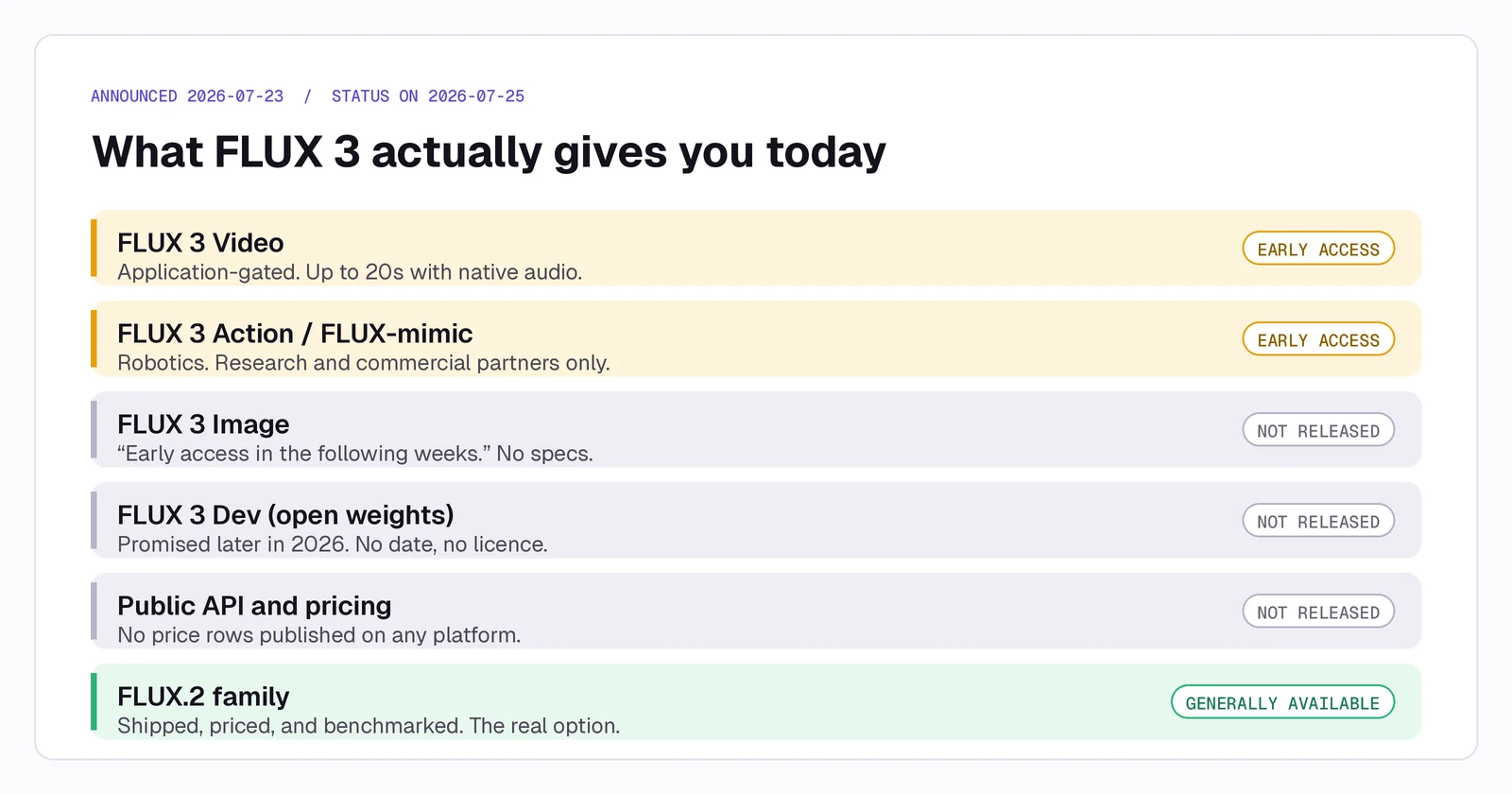
FLUX 3 is presented as one model family trained jointly across image, video, audio, and action, rather than four separate systems. The announcement covers FLUX 3 Video, FLUX 3 Image, FLUX 3 Action (with a robotics variant called FLUX-mimic), and a future open-weights FLUX 3 Dev.
Availability is a different table entirely.
Warning
There is no public FLUX 3 pricing, no published parameter count, no technical report for the model family, and no licence terms for the promised open-weights release. Any spec sheet you find quoting FLUX 3 Image resolution, reference-image limits, or per-image cost is extrapolation, not documentation.
The image model is the missing piece
BFL's own wording is that FLUX 3 Image will get "an early access phase in the following weeks." That is the entire public commitment. No date, no specs, no benchmark.
This matters more than a normal staggered rollout, because image generation is what the FLUX brand means. FLUX.1 and its Kontext editing line became a default in open-weight pipelines. Announcing a flagship generation without that component available — while competitors ship image models weekly — leaves creators with claims they cannot test.
The practical consequence: you cannot evaluate FLUX 3 for image work today, and neither can anyone else. Claims circulating about its text rendering, character consistency, or prompt adherence have no independent evaluation behind them. Treat them as marketing until the model is testable.
FLUX 3 Video: 20 seconds with native audio
The component that did ship — to approved early-access applicants — is the genuinely interesting one. FLUX 3 Video generates clips up to 20 seconds long with natively synchronised audio, rather than generating silent video and scoring it afterwards. It also covers image-to-video, keyframe-to-video, and multi-shot chaining.
Twenty seconds with native sound is a meaningful length. Most flagship video models are still tuned around 5-to-10-second clips, and stitching those into something coherent is where a lot of production time goes. If FLUX 3 holds character and audio continuity across a 20-second span, that's a real workflow change.
It also tells you what BFL thinks the growth market is. A still-image house building image-to-video and shot chaining is a company trying to own the whole pipeline, not just the first frame.
Reading BFL's benchmark table honestly
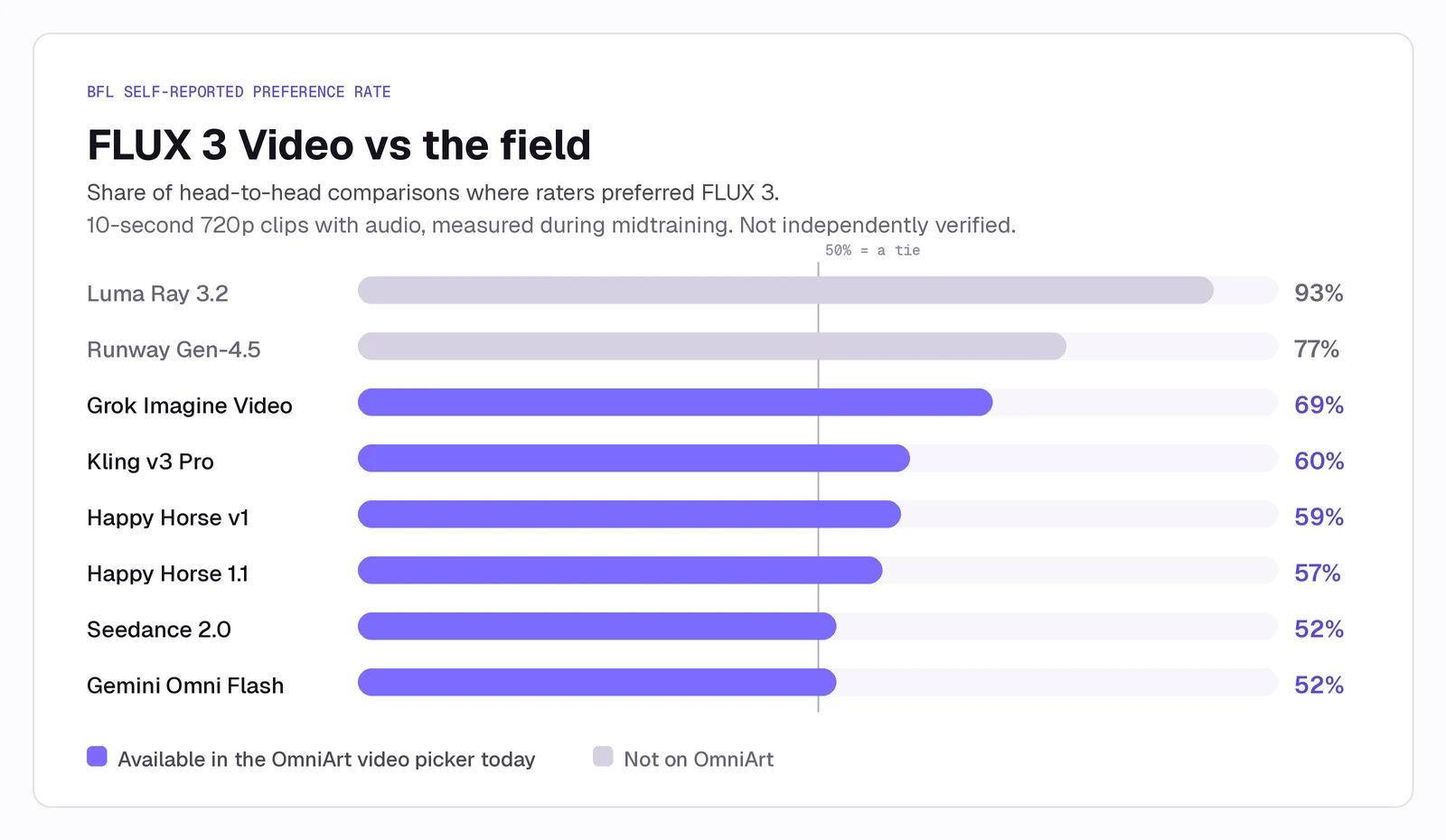
BFL published preference rates for FLUX 3 Video against eight competitors. Before reading them, note the four qualifiers BFL itself attaches: the numbers are self-reported, preliminary, measured during midtraining, on 10-second 720p clips. There is no independent verification.
Two things stand out.
The wins are against the models furthest from the frontier. The 93% figure is against Luma Ray 3.2 and the 77% against Runway Gen-4.5. Those are the widest margins on the chart, and they're also the two comparisons where the bar is lowest.
Against the current frontier, it's a tie. FLUX 3 was preferred in 52% of comparisons against Seedance 2.0 and 52% against Gemini Omni Flash. In a preference test, 52% is a coin flip. Credit to BFL for publishing that honestly rather than quietly dropping the rows — but a coin flip against models you can already generate with today is not a reason to wait for a waitlist.
Five of the eight models on that chart are in the OmniArt video picker right now: Grok Imagine, Kling, Happy Horse, Seedance 2.0, and Gemini Omni Flash. You can run the brief BFL benchmarked against, this afternoon, and judge the baseline yourself.
Note
The clips below are Seedance output generated on OmniArt — the model FLUX 3 scored 52% against. They are here to show the current baseline you can actually produce today, not to represent FLUX 3 output. No public FLUX 3 samples exist that we can independently verify.
Self-Flow: the architecture claim worth tracking
The technical idea behind FLUX 3 is called Self-Flow — self-supervised flow matching with per-token timestep conditioning, published as research alongside the launch. The claim is faster convergence than prior representation-alignment approaches, and a single underlying architecture in which image, video, audio, and action training constrain one another.
If that holds, the interesting consequence isn't a better image model. It's that improvements in one modality should lift the others, because they share the representation rather than sitting in separate towers. That's the same bet Google made with the Gemini omni line, arriving from the opposite direction — Google came from language, BFL is coming from pixels.
It's a bet worth tracking. It is not yet a result you can use.
The FLUX.2 reality check
Because FLUX 3 Image doesn't exist publicly, the newest usable FLUX image model is still FLUX.2, which shipped in November 2025 and extended through a max tier in December and a compact klein line in January 2026.
| Variant | Availability | List price | Notes |
|---|---|---|---|
| FLUX.2 [max] | API | $0.07 / MP | Top tier; adds grounded generation with live web retrieval |
| FLUX.2 [pro] | API | $0.03 / MP | The cost-efficient default for generation and editing |
| FLUX.2 [flex] | API | $0.06 / MP | Exposes steps and guidance; tuned for typography |
| FLUX.2 [dev] 32B | Open weights | Self-host | Non-commercial licence; commercial use is a paid tier |
| FLUX.2 [klein] 4B | Open weights | Self-host | Apache 2.0 — the only permissively licensed variant |
Where FLUX.2 still wins
- Multi-reference consistency. Eight reference images through the API, ten in the playground. Lock a face, a product, a lighting setup, and generate a coherent series. This remains its clearest structural advantage.
- Brand-exact colour. Hex values bound to a named object are a documented, first-class feature. Bind the value to the thing — "the car is #FF0000" — rather than letting it float in the prompt.
- Material photorealism. Subsurface scattering in skin, specular behaviour on glass and metal, how fabric absorbs versus reflects.
- Grounded generation on [max]. Live web retrieval during generation, for current products and recent events. Nothing else in its tier does this.
Where it has fallen behind
The blind-preference picture is less flattering. On the Artificial Analysis text-to-image arena, FLUX.2 [max] currently sits around 16th, behind GPT Image 2, the Nano Banana 2 family, and Seedream 5.0 Pro. FLUX.2 [dev] — the 32B open flagship — sits below Qwen Image 2.0 Pro, a 7B Apache-2.0 model.
Other friction worth knowing before you commit a pipeline to it:
- No negative prompts. Rewrite everything positively. "Sharp focus throughout" instead of "no blur."
- Licence limits. The 32B [dev] weights are non-commercial. Only the 4B klein variant is Apache 2.0.
- Hardware cost. Full-precision [dev] plus its 24B Mistral text encoder is far past consumer VRAM; the community runs quantised builds with quality loss.
- Anatomy complaints. Hands and multi-person interaction are recurring failure modes in community threads, particularly on the distilled klein variants at their default low step counts.
Prompt patterns that carry over
BFL's published prompting guidance for FLUX.2 is good craft advice that transfers to most modern image models, including the ones on OmniArt.
Structure as Subject + Action + Style + Context. Word order carries weight; lead with what matters most. Thirty to eighty words is the documented sweet spot.
Quote literal text. The text 'OPEN' appears in red neon letters — then specify placement, weight, and colour.
Describe fonts, don't name them. "Bold geometric sans-serif with slightly extended kerning" lands far more reliably than naming a typeface.
Assign a role to every reference image. Say which input supplies the subject, which supplies the style, and which supplies the background.
Use JSON when you need to version a brief. Freeze the structure, change exactly one key per variant, and you get a controlled comparison instead of a re-roll:
{
  "scene": "Studio product photography on polished concrete",
  "subjects": [{ "description": "Matte black ceramic mug, steam rising", "position": "center foreground" }],
  "style": "Ultra-realistic commercial product photography",
  "color_palette": ["matte black", "concrete gray", "soft white highlights"],
  "lighting": "Three-point softbox, soft diffused highlights, no harsh shadows",
  "camera": { "angle": "high", "lens-mm": 85, "f-number": "f/5.6" }
}
Tip
The single highest-value habit from BFL's guide is positive rewriting. Instead of "headlights not on the subject," write "headlights pointing down the road, illuminating the wet asphalt ahead, leaving the figure in soft silhouette." It works on every model, not just FLUX.
What to do this week
If you were waiting on FLUX 3 to start a project, the honest advice is not to wait. The image model has no date, and the video model is gated behind an application with no published pricing.
| If you wanted FLUX 3 for… | Do this today |
|---|---|
| Photoreal stills and product work | GPT Image 2 or Seedream 5.0 Pro in the OmniArt image picker |
| Multi-reference character consistency | Seedream 5.0 Pro, which takes up to 10 reference images |
| Text-heavy layouts and posters | GPT Image 2 — the current leader on in-image text |
| Long clips with synchronised sound | Seedance 2.0 or Gemini Omni Flash, both live now |
| A still you already like, turned into motion | Any image-to-video model on OmniArt |
The last row is the one most people underrate. The pipeline BFL is trying to own — generate a still, then animate it — already works end to end in one workspace. Our image-to-video model guide covers which model to pick for which kind of motion, and the Seedance prompt guide covers how to direct a shot rather than just describe it.
Described
Directed
What to watch next
Three signals will tell you whether FLUX 3 is worth revisiting.
- FLUX 3 Image early access opening, with specs. Reference-image count, native resolution, and pricing are the numbers that determine whether it competes.
- Independent benchmarks for FLUX 3 Video. Provider preference tests measured during midtraining are a starting point, not a result. Arena placement against Seedance and the Gemini omni line is the real test.
- The open-weights licence. FLUX.2 [dev] was non-commercial, and that single decision cost BFL much of its open-source position. Whether FLUX 3 Dev repeats it will decide if the local ecosystem comes back.
Getting started on OmniArt
You don't need to pick a side in the FLUX 3 rollout to make something this week. OmniArt keeps image, video, audio, and music generation in one workspace, with the current flagship models — GPT Image 2, Nano Banana, Seedream, Seedance, Kling, Veo, Grok Imagine, and Gemini Omni Flash — behind a single picker and a single credit balance.
That's the practical answer to a gated launch: you evaluate models against your own brief instead of a provider's chart, and you switch when something genuinely better ships. When FLUX 3 Image becomes testable, we'll run it against the same briefs and publish the comparison. Until then, see every video model in one workspace for what's available today.
Ready to create?
Start generating amazing content with AI